Showing posts with label mysql. Show all posts
Showing posts with label mysql. Show all posts
Set up MySQL password is one of the important task ,Now i am showing you how set a password for your MySQL root account using command prompt .
Steps
Step1
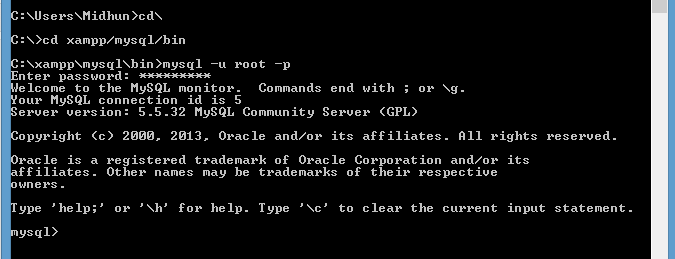
how to login mysql from cmd
 Step2
Step2
changing root password

Step 3
flush previleges

Steps
- log in MySql from cmd.
- Change password
- flush privilege
Step1
how to login mysql from cmd
changing root password
Step 3
flush previleges
Ajax auto Suggest is our first article on 2013 .in
this article we presenting a simple auto suggest input text field. Here using Ajax,
PHP, js and jquery. process of this code snippet follows steps given bellow

- Whenever a key press event on a text box occur, a function in JavaScript is called which uses ajax to send the input in the text box to the name_fetch.php
- Then name_fetch.php receives a post request and check for any matches in the database.
- Matched result is sent back to the JavaScript code, Ajax, and display that bellow text box .
Program look like

- Index.html :-This is the index file ,which there is input box and the result to be shown as shown in the image above
- script.js :-This file holds the ajax code used to send and receive ajax requests to/from the server.
- config.php :-this code contain database connection information.
- name_fetch.php :-this code fetch name and send to script.
Download
 |
| Download full code |
name_fetch.php
<?php
	include("config.php");
	$keyword = $_POST['data'];
	$sql = "select name from ".$db_table." where ".$db_column." like '".$keyw         ord."%' limit 0,20";
	//$sql = "select name from ".$db_table."";
	$result = mysql_query($sql) or die(mysql_error());
	if(mysql_num_rows($result))
	{
		echo '<ul class="list">';
		while($row = mysql_fetch_array($result))
		{
			$str = strtolower($row['name']);
			$start = strpos($str,$keyword);
			$end   = similar_text($str,$keyword);
			$last = substr($str,$end,strlen($str));
			$first = substr($str,$start,$end);

			$final = '<span class="bold">'.$first.'</span>'.$last;

			echo '<li><a href=\'javascript:void(0);\'>'.$final.'</a><                              /li>';
		}
		echo "</ul>";
	   }
	    else
		echo 0;
     ?>
script.js
/*
 cc:scriptime.blogspot.in
 edited by :scriptime
*/
$(document).ready(function(){
	$(document).click(function(){
		$("#ajax_response").fadeOut('slow');
	});
	$("#keyword").focus();
	var offset = $("#keyword").offset();
	var width = $("#keyword").width()-2;
	$("#ajax_response").css("left",offset.left);
	$("#ajax_response").css("width",width);
	$("#keyword").keyup(function(event){
		 //alert(event.keyCode);
		 var keyword = $("#keyword").val();
		 if(keyword.length)
		 {
			 if(event.keyCode != 40 && event.keyCode != 38 && event.keyCode != 13)
			 {
				 $("#loading").css("visibility","visible");
				 $.ajax({
				   type: "POST",
				   url: "name_fetch.php",
				   data: "data="+keyword,
				   success: function(msg){
					if(msg != 0)
					  $("#ajax_response").fadeIn("slow").html(msg);
					else
					{
					  $("#ajax_response").fadeIn("slow");
					  $("#ajax_response").html('<div style="text-align:left;">No Matches Found</div>');
					}
					$("#loading").css("visibility","hidden");
				   }
				 });
			 }
			 else
			 {
				switch (event.keyCode)
				{
				 case 40:
				 {
					  found = 0;
					  $("li").each(function(){
						 if($(this).attr("class") == "selected")
							found = 1;
					  });
					  if(found == 1)
					  {
						var sel = $("li[class='selected']");
						sel.next().addClass("selected");
						sel.removeClass("selected");
					  }
					  else
						$("li:first").addClass("selected");
					 }
				 break;
				 case 38:
				 {
					  found = 0;
					  $("li").each(function(){
						 if($(this).attr("class") == "selected")
							found = 1;
					  });
					  if(found == 1)
					  {
						var sel = $("li[class='selected']");
						sel.prev().addClass("selected");
						sel.removeClass("selected");
					  }
					  else
						$("li:last").addClass("selected");
				 }
				 break;
				 case 13:
					$("#ajax_response").fadeOut("slow");
					$("#keyword").val($("li[class='selected'] a").text());
				 break;
				}
			 }
		 }
		 else
			$("#ajax_response").fadeOut("slow");
	});
	$("#ajax_response").mouseover(function(){
		$(this).find("li a:first-child").mouseover(function () {
			  $(this).addClass("selected");
		});
		$(this).find("li a:first-child").mouseout(function () {
			  $(this).removeClass("selected");
		});
		$(this).find("li a:first-child").click(function () {
			  $("#keyword").val($(this).text());
			  $("#ajax_response").fadeOut("slow");
		});
	});
});
Output

It’s our new tutorial about Facebook status update using php
SDK, you can update your Facebook status using simple PHP code and Facebook Graph API. This is the
most naïve way to use this; you can extend this to make your own script to
update your status from mobile.

 |
| download |
Ok let’s get started now! To be very frank, the status update
script is already there in the SDK provided by Facebook, but very few people
know. And there are people who won’t even know how easy it is.
Steps
1. Create a Facebook app.
Login to Facebook
and go to http://www.facebook.com/developers Click on
the button at top right where it says “+ Set up New App”

Now let’s
give a name to your app.

Next is
to put the Canvas Page and Canvas URL. This Canvas
Page will be used to Canvas URL is the location from where Facebook
pulls all the content of your APP.

You will see your application’s unique App ID, API Key,
App secret, keep it safe and we are going to use these in our example.

2.
Install
Facebook php SDK.
You can download the latest version of SDK from https://github.com/facebook/php-sdk/and
hit download.
I have downloaded the
latest version which is 2.1.2 till date.
We are going to use src folder which has the
necessary code to interact with the Facebook API. Upload this folder to thehttp://yourdomain.com/fb-app-folder
|
download source code |
3. Create php status update code and add secret code and app id.
Create your file which will update the status, call it as
index.php .
<h1>Facebook Status Update</h1>
<?phpif ($_SERVER["REQUEST_METHOD"] == "POST") {
$status = $_POST['status'];
$facebook_id = $userdata['id'];
$params = array(
'access_token' => $access_token,
'message' => $status
);
$url = "https://graph.facebook.com/$facebook_id/feed";
$ch = curl_init();
curl_setopt_array($ch, array(
CURLOPT_URL => $url,
CURLOPT_POSTFIELDS => $params,
CURLOPT_RETURNTRANSFER => true,
CURLOPT_SSL_VERIFYPEER => false,
CURLOPT_VERBOSE => true
));
$result = curl_exec($ch);
// End
echo "<span style='color:#cc0000'>Message Updated</span>";
}?>
<form method="post" action="index.php">
<textarea name="status"></textarea> <br/>
<input type="submit" value=" Update "/>
</form>
<?phpif ($_SERVER["REQUEST_METHOD"] == "POST") {
$status = $_POST['status'];
$facebook_id = $userdata['id'];
$params = array(
'access_token' => $access_token,
'message' => $status
);
$url = "https://graph.facebook.com/$facebook_id/feed";
$ch = curl_init();
curl_setopt_array($ch, array(
CURLOPT_URL => $url,
CURLOPT_POSTFIELDS => $params,
CURLOPT_RETURNTRANSFER => true,
CURLOPT_SSL_VERIFYPEER => false,
CURLOPT_VERBOSE => true
));
$result = curl_exec($ch);
// End
echo "<span style='color:#cc0000'>Message Updated</span>";
}?>
<form method="post" action="index.php">
<textarea name="status"></textarea> <br/>
<input type="submit" value=" Update "/>
</form>


