Showing posts with label html. Show all posts
Showing posts with label html. Show all posts
Node Js gives ability for JavaScript to write back end code .It is one of the perfect technologies for real time application .Now we discussing how to write a simple chat server ad client using node js .
Steps


 |
| Download code |
Steps
- Install and setup node js
- Create a TCP server
- Create a TCP client
Install and setup node
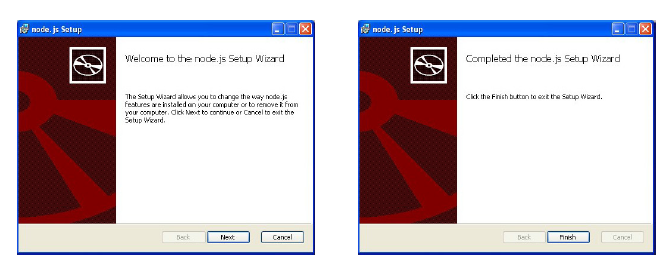
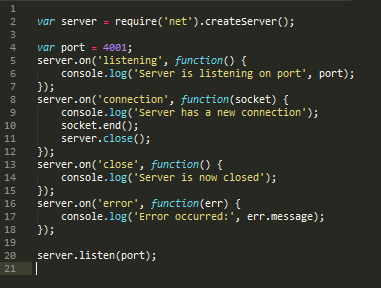
First step on node is how to setup a node.js platform ,now i am only discussing on windows .node supports windows OS since 0.6 version ,for installing go to node.js website and from download tab download http://nodejs.org/download/ windows .msi installer .After down loading run the installer and click next and install node ,it will show a conform message after it install properly
now you installed node properly now we want to know node is working properly or note
go to cmd and type node -v
Create TCP server
Node has a first-class HTTP server implementation in the form of a pseudo-class in http .Server, which descends from the TCP server pseudo-class in net.Server. This means that everything described in this chapter applies to the Node HTTP server as well.
- You can create a TCP server using the net module
now we just create a node js server and u can connect client through the port 4001 , using telnet

now these things are working proper you finished how to set up a simple TCP server using node and how to connect that TCP port using telnet
Building a simple tcp server have flowing steps
1.Create a tcp server
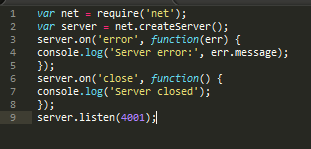
2.Accept connection

3 Receiving client data
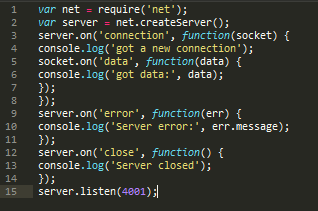
4.Collecting all clients

5. Broadcasting

These are the steps for creating tcp chat server . in this project i am attaching a full set of working TCP server and TCP client with this post .
- Create a tcp server
- Accept connection
- Receiving client data
- Collecting all the clients
- Broadcasting data
1.Create a tcp server
2.Accept connection
3 Receiving client data
4.Collecting all clients
5. Broadcasting
These are the steps for creating tcp chat server . in this project i am attaching a full set of working TCP server and TCP client with this post .
|
| Download code |
Password strength meter
Here we indrodusing a simple password strength meter,it measure of the effectiveness of a password in resisting guessing and brute-force attacks. In
its usual form, it estimates how many trials an attacker who does not have
direct access to the password would need, on average, to guess it correctly.
The strength of a password is a function of length, complexity, and
unpredictability


HTML Code
<form name=df style='margin:0px;'><p class="border">Enter Password .<input type=password length=20 name='pwd' style="text-decoration:none;color: #dddd;"onkeyup='CheckPasswordStrength(this.value);'></p><div id='pwd_strength'></div></br></form>
JavaScript Code
<script type="text/javascript">

var pass_strength;

function IsEnoughLength(str,length)
{
 if ((str == null) || isNaN(length))
  return false;
 else if (str.length < length)
  return false;
 return true;

}

function HasMixedCase(passwd)
{
 if(passwd.match(/([a-z].*[A-Z])|([A-Z].*[a-z])/))
  return true;
 else
  return false;
}

function HasNumeral(passwd)
{
 if(passwd.match(/[0-9]/))
  return true;
 else
  return false;
}

function HasSpecialChars(passwd)
{
 if(passwd.match(/.[!,@,#,$,%,^,&,*,?,_,~]/))
  return true;
 else
  return false;
}


function CheckPasswordStrength(pwd)
{
 if (IsEnoughLength(pwd,14) && HasMixedCase(pwd) && HasNumeral(pwd) && HasSpecialChars(pwd))
  pass_strength = "<b><font style='color:olive'>Very strong</font></b>";
 else if (IsEnoughLength(pwd,8) && HasMixedCase(pwd) && (HasNumeral(pwd) || HasSpecialChars(pwd)))
  pass_strength = "<b><font style='color:Blue'>Strong</font></b>";
 else if (IsEnoughLength(pwd,8) && HasNumeral(pwd))
  pass_strength = "<b><font style='color:Green'>Good</font></b>";
 else
  pass_strength = "<b><font style='color:red'>Weak</font></b>";

 document.getElementById('pwd_strength').innerHTML = pass_strength;
}
function ctck()
{
     var sds = document.getElementById("dum");
     if(sds == null){
        alert("You are using a free package.\n You are not allowed to remove the tag.\n");
     }
     var sdss = document.getElementById("dumdiv");
     if(sdss == null){
         alert("You are using a free package.\n You are not allowed to remove the tag.\n");
     }
}
document.onload ="ctck()";
</script>
Don't Forget To Comment ...!
scriptime.blogspot.in
JavaScript
Embedding YouTube videos from links
Embedding video to a webpage make
a real change in the early day’s web. It
can make a multimedia interaction with web user and author .so feel of
that website become more realistic .most of users have broadband connection so
they are flexible with video contents .one of the most common used method is
using a flash player and flv videos those hosted in an external server
,like YouTube .

Embedding
YouTube

Code
function linkToYoutube(link, ops) {
var o = $.extend({ width: 480, height: 320, params: '' }, ops); var id = /\?v\=(\w+)/.exec(link)[1]; return '<iframe style="display: block;"'+ ' class="youtube-video" type="text/html"'+ ' width="' + o.width + '" height="' + o.height + ' "src="http://www.youtube.com/embed/' + id + '?' + o.params + '&wmode=transparent" frameborder="0" />'; } $('a').each(function(){ var link = $(this).attr('href'); $(this).html( linkToYoutube(link, { params: 'theme=light' }) ); })
Download & Live Code Edit

JavaScript love calculator
Hello friends now we presenting a simple java script love calculater .Its the first tutorial that having live demo on our blog . its simple funny and use some mathematics functions ,so it will help to understand how works java script functions and button click listeners..

Live demo
Love Tester
Source
function calc() {
first = document.loveform.name1.value.toUpperCase();
firstlength = document.loveform.name1.value.length;
second = document.loveform.name2.value.toUpperCase();
secondlength = document.loveform.name2.value.length;
var LoveCount=0;

for (Count=0; Count < firstlength; Count++) {
letter1=first.substring(Count,Count+1);
if (letter1=='L') LoveCount+=2;
if (letter1=='O') LoveCount+=2;
if (letter1=='V') LoveCount+=2;
if (letter1=='E') LoveCount+=2;
if (letter1=='Y') LoveCount+=3;
if (letter1=='O') LoveCount+=1;
if (letter1=='U') LoveCount+=3;
}

for (Count=0; Count < secondlength; Count++) {
letter2=second.substring(Count,Count+1);
if (letter2=='L') LoveCount+=2;
if (letter2=='O') LoveCount+=2;
if (letter2=='V') LoveCount+=2;
if (letter2=='E') LoveCount+=2;
if (letter2=='Y') LoveCount+=3;
if (letter2=='O') LoveCount+=1;
if (letter2=='U') LoveCount+=3;
}

amount=0;
if (LoveCount> 0) amount=  5-((firstlength+secondlength)/2)
if (LoveCount> 2) amount= 10-((firstlength+secondlength)/2)
if (LoveCount> 4) amount= 20-((firstlength+secondlength)/2)
if (LoveCount> 6) amount= 30-((firstlength+secondlength)/2)
if (LoveCount> 8) amount= 40-((firstlength+secondlength)/2)
if (LoveCount>10) amount= 50-((firstlength+secondlength)/2)
if (LoveCount>12) amount= 60-((firstlength+secondlength)/2)
if (LoveCount>14) amount= 70-((firstlength+secondlength)/2)
if (LoveCount>16) amount= 80-((firstlength+secondlength)/2)
if (LoveCount>18) amount= 90-((firstlength+secondlength)/2)
if (LoveCount>20) amount=100-((firstlength+secondlength)/2)
if (LoveCount>22) amount=110-((firstlength+secondlength)/2)

if (firstlength==0 || secondlength==0) amount= "Err";
if (amount < 0) amount= 0;
if (amount >99) amount=99;

document.loveform.output.value=amount+"%";
}
Download Source


